Couriers and shipping

The waybill is created from the order with one click, and nobody retypes anything on the courier's website. The address is checked against that courier's own reference data, the label prints straight away, and statuses and cash-on-delivery amounts flow back into the system.

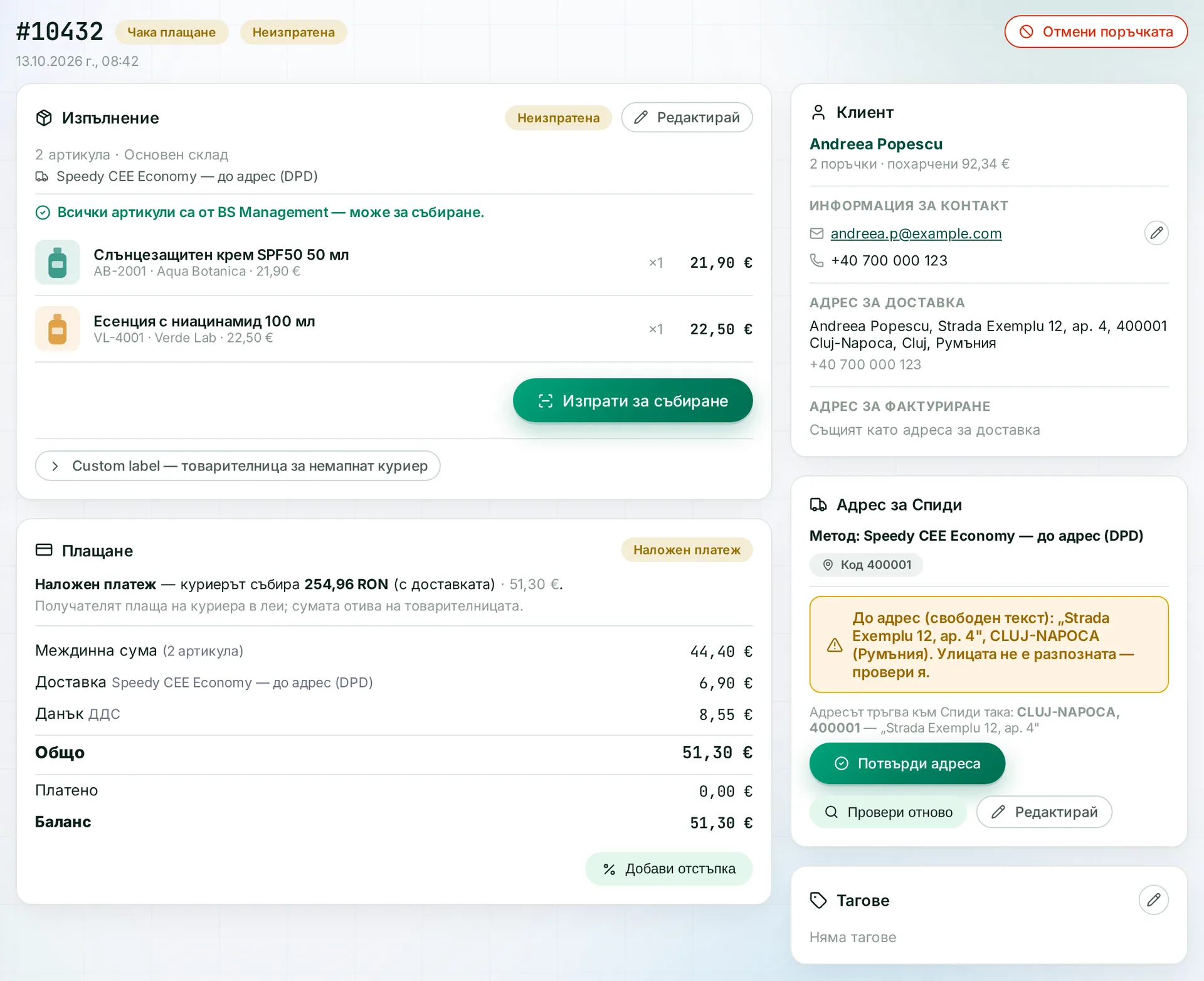
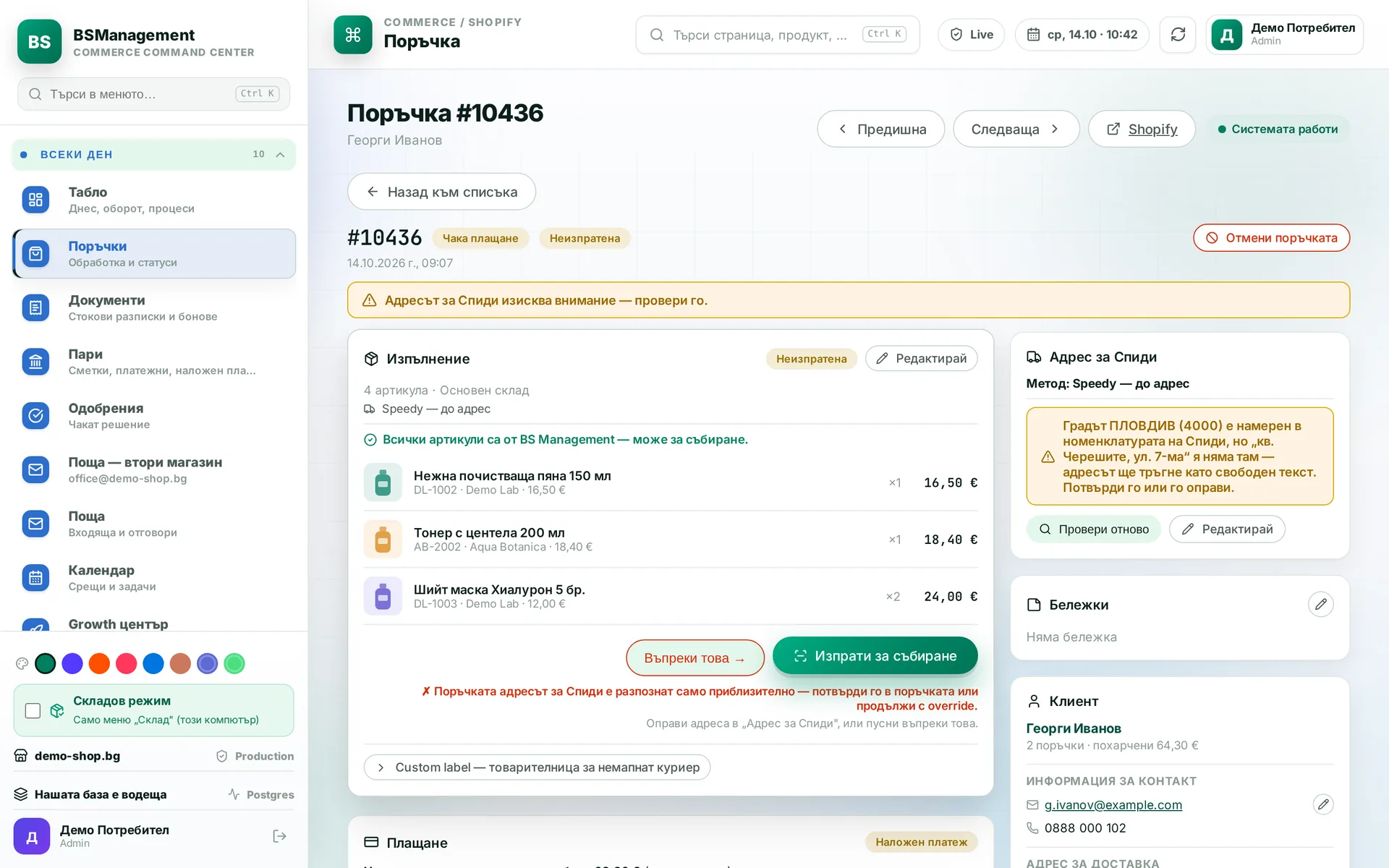
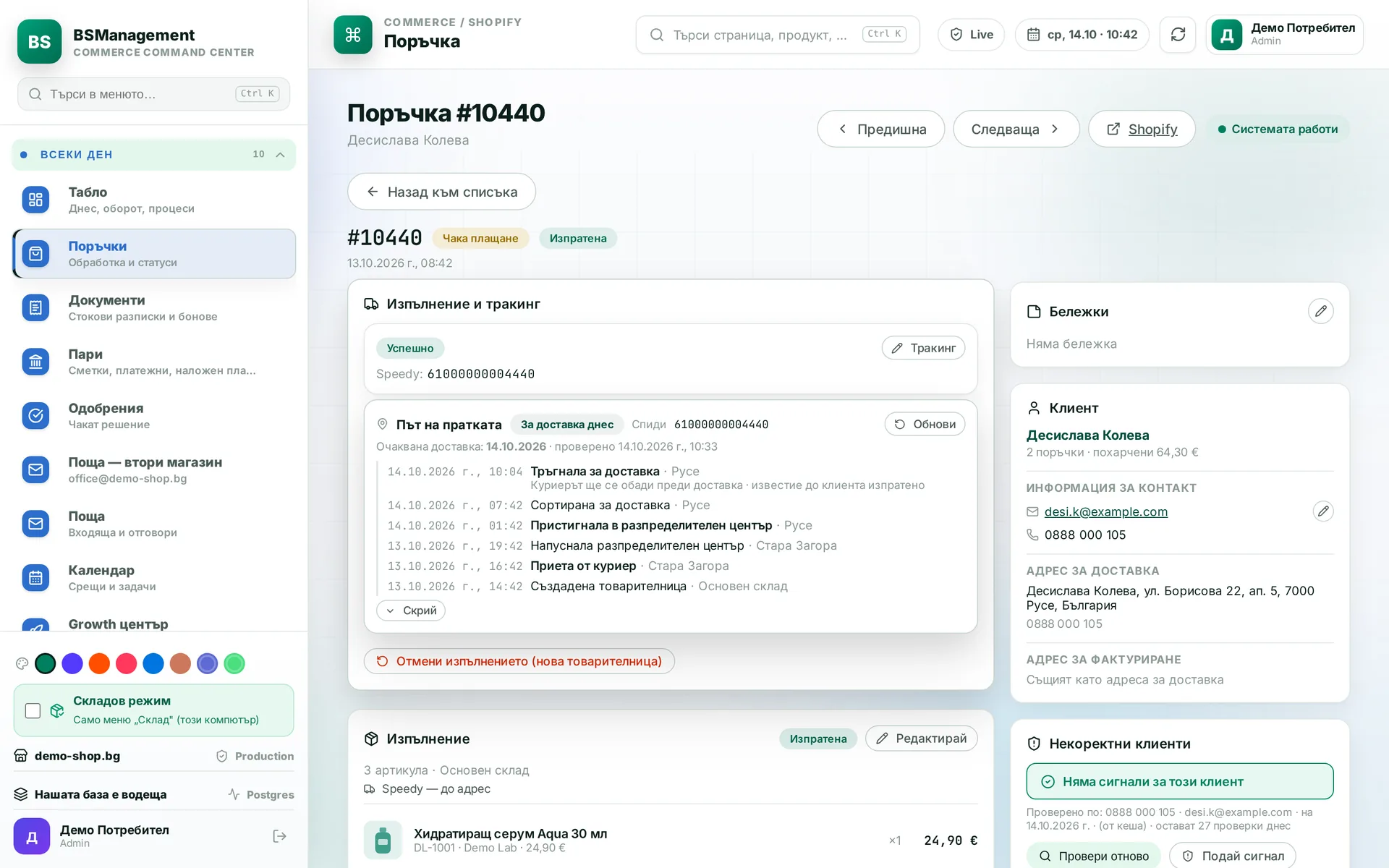
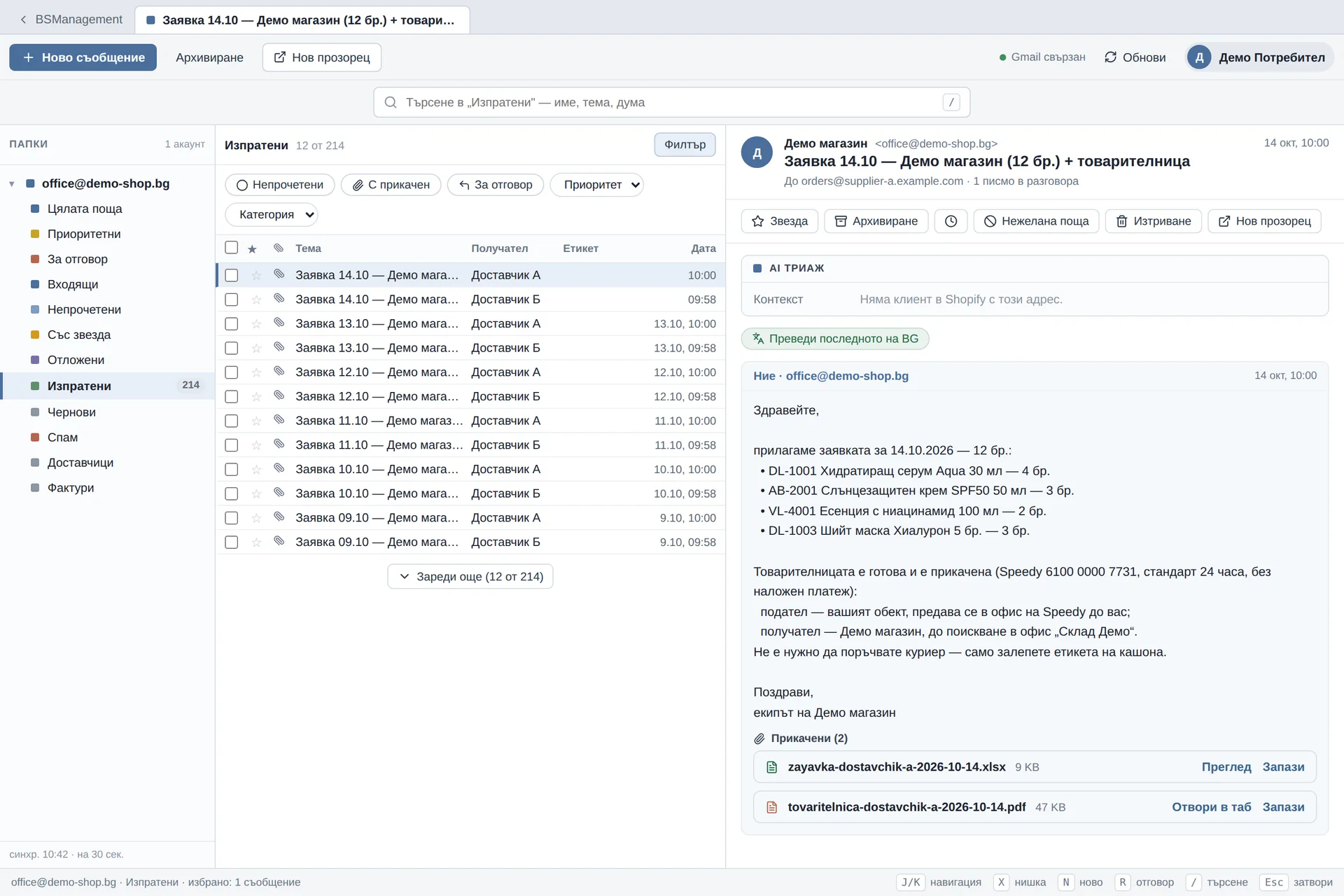
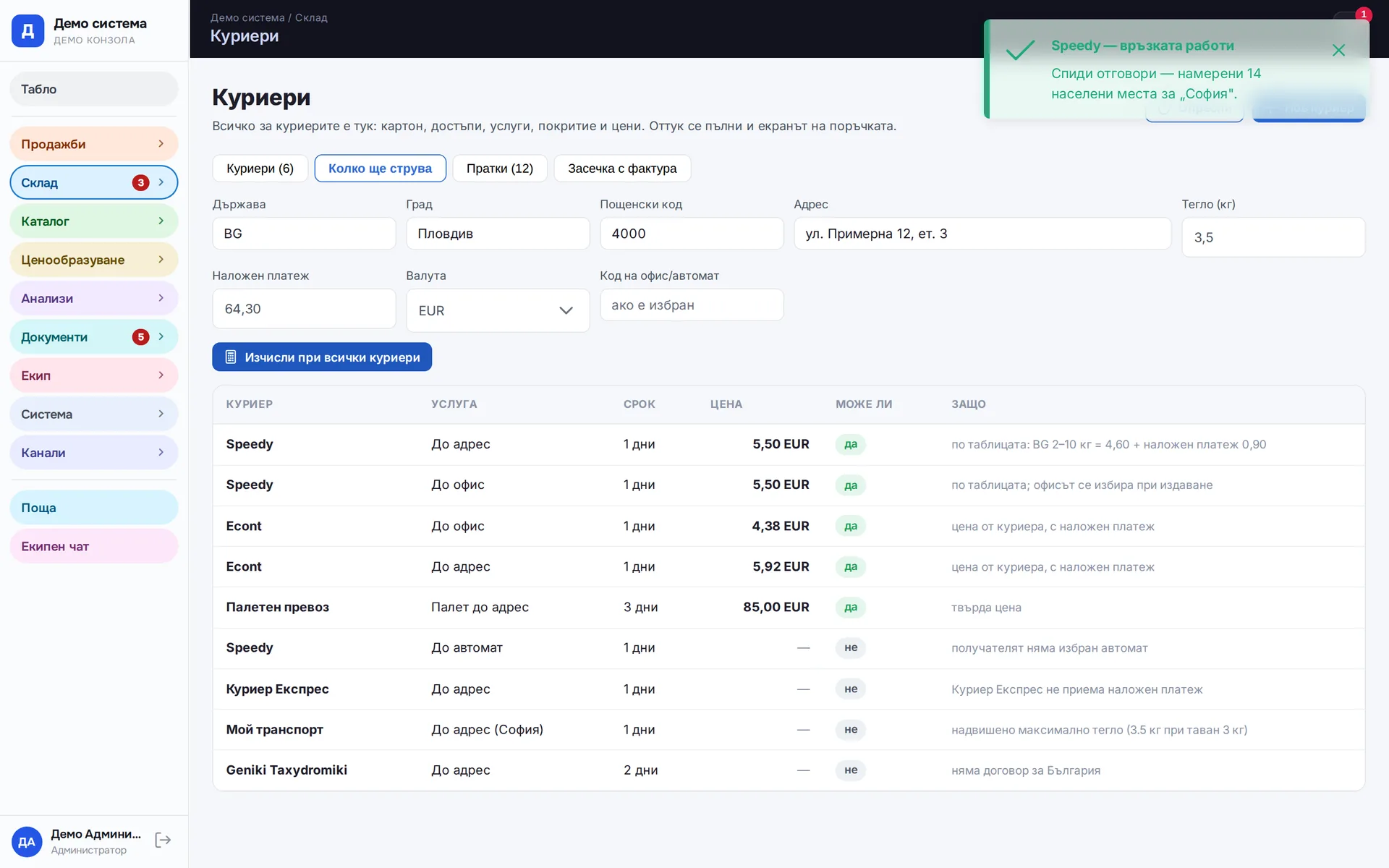
Speedy on the order: the office is checked against Speedy's lists, the waybill is issued and its number is on the fulfilment
Speedy

What problems it solves

When waybills are made on the courier's website, someone retypes the name, phone, address and cash-on-delivery amount for every parcel. Each retype can introduce a mistake, and the mistake only shows when the parcel comes back. Then the tracking number is copied back into the order, if someone remembers.

The second half of the problem comes after dispatch. Statuses stay with the courier, COD statements arrive by email, and the courier's invoice is checked by eye, if at all. Money in transit becomes the hardest part of the business to see.

Our approach ties the order, the parcel and the money into one record. The waybill is issued with a button on the order, and everything the courier sends back (number, status, payout, charge) is added to that same record.

How it works

A parcel goes through a few clear moments, and each one is visible on screen.

  1. The order arrives with the address the customer typed. The system checks it against the reference data of the courier that will carry the parcel, and recognises an office or locker if the customer wrote it in the wrong field.
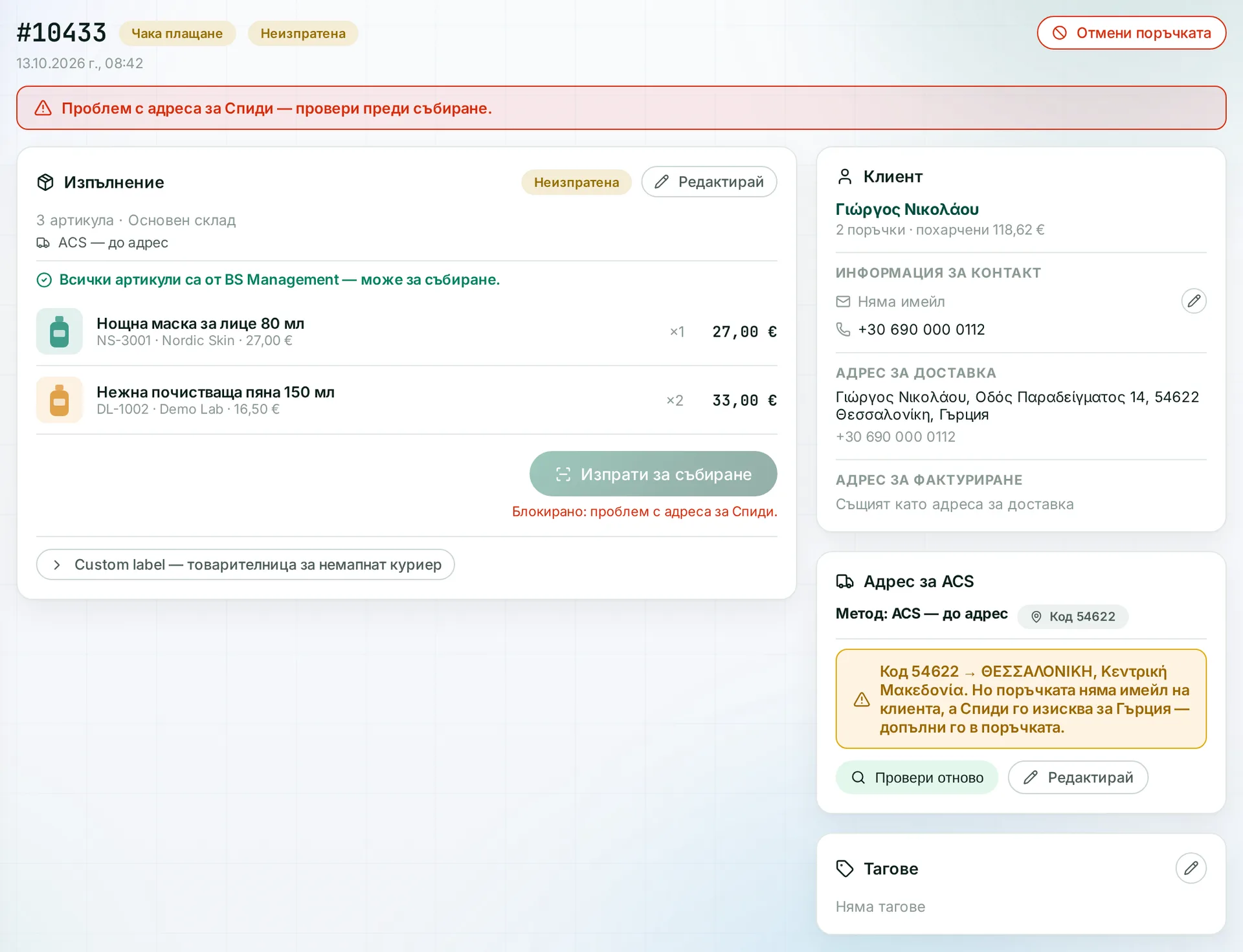
  2. If the address cannot be found, the order is flagged red and does not ship until someone confirms or fixes it. The message says exactly what is missing.
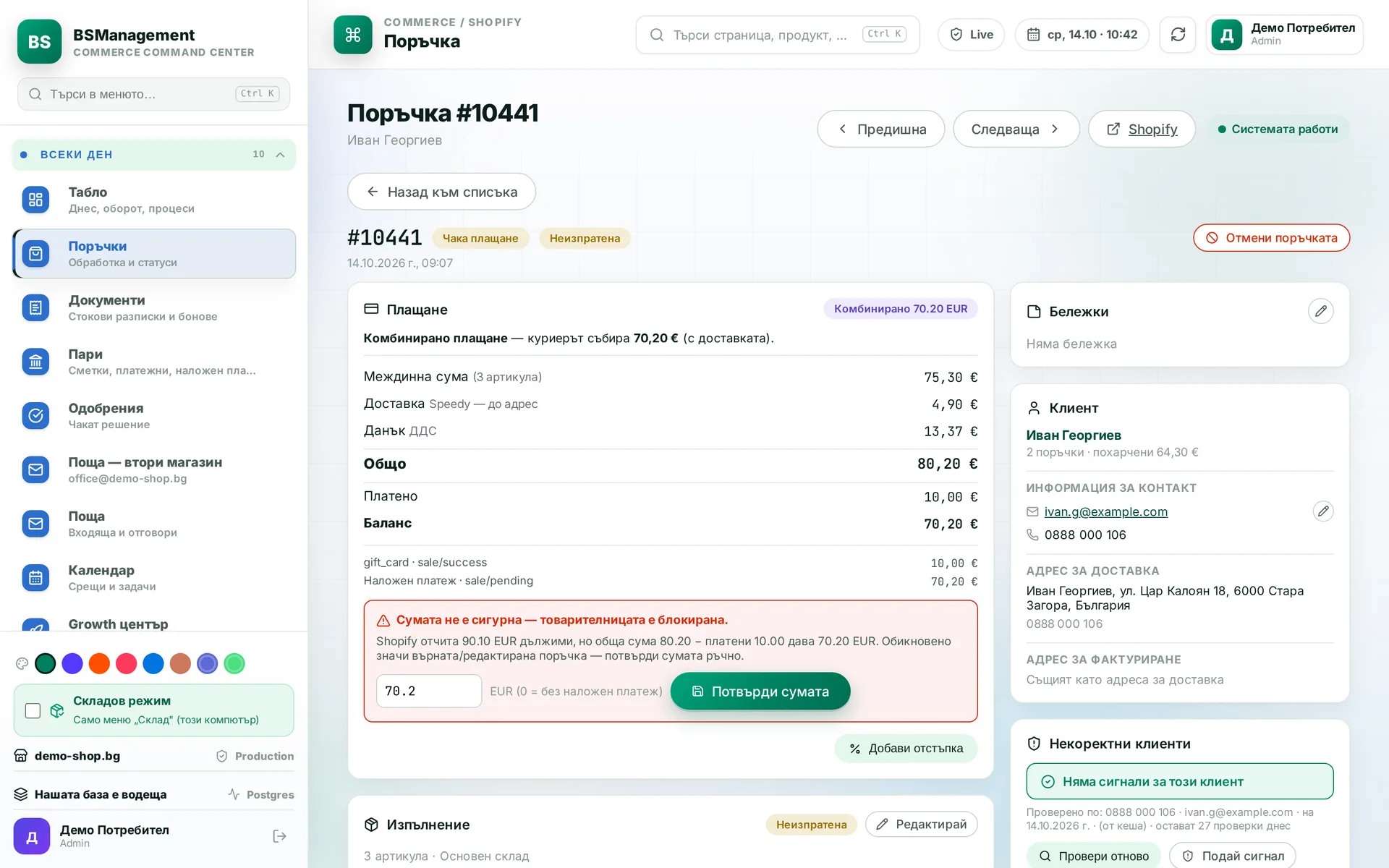
  3. The operator sees which couriers and services can take the parcel, based on country, weight and delivery type, and picks one. Unsuitable options stay visible at the bottom with the reason.
  4. On confirmation the waybill is created with the courier, its number is saved on the order and the label prints straight away.
  5. The system pulls statuses from the courier and carries them into the order and the store. The customer is notified when the parcel is out for delivery and when it is delivered.
  6. COD statements and courier invoices are matched to parcels by waybill number. A delivered COD order is marked as paid, and differences are shown line by line.

Two levels of courier connection

Not every courier offers a connection that lets our system create the waybill. So we work on two levels and list them separately further down the page.

With full integration the system connects to the courier directly: it creates the waybill, receives the label and number, and later pulls the statuses. You do not need to open another window.

With a manual number the waybill is made with the courier. Then the number is entered on the order, or the label is attached as a PDF and the system reads the number from it. From then on the parcel is visible, tracked and reported like all the others. Posts, smaller couriers and your own transport go through the same process, and the reports do not miss a single parcel.

A courier can move from the second level to the first when that makes sense. Orders and reports do not notice the difference, because the parcel record stays the same.

What you get

  • A waybill from the order in one click, with no retyping and no separate portal.
  • Address checks before dispatch, following the rules of the relevant courier and country.
  • A label that prints the moment the order is confirmed, and a way to reprint it if the printer jams.
  • A clear picture of the money held by couriers: what has been delivered, what has been paid out and what has not.
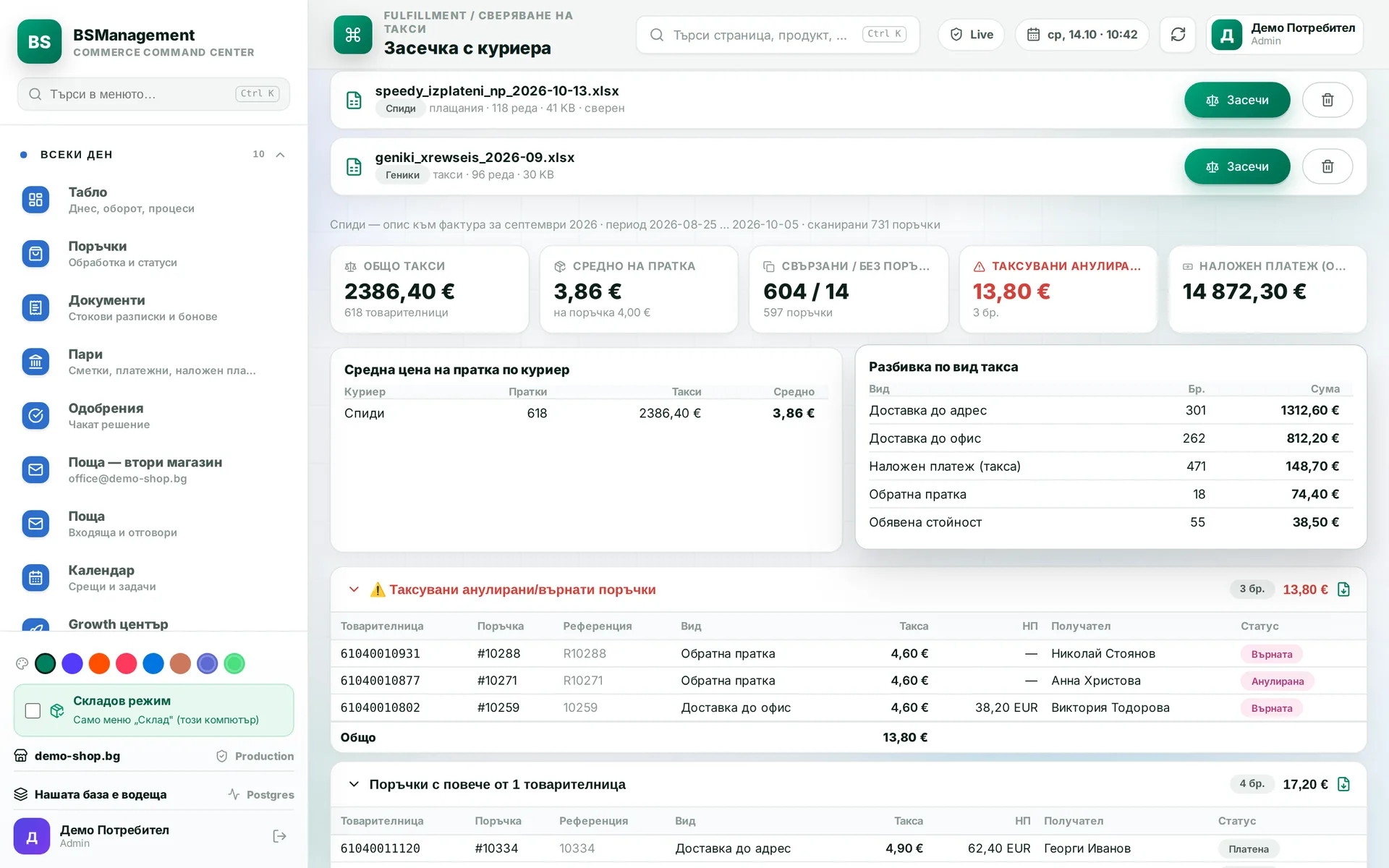
  • Courier invoices checked against what the system expected to be charged.
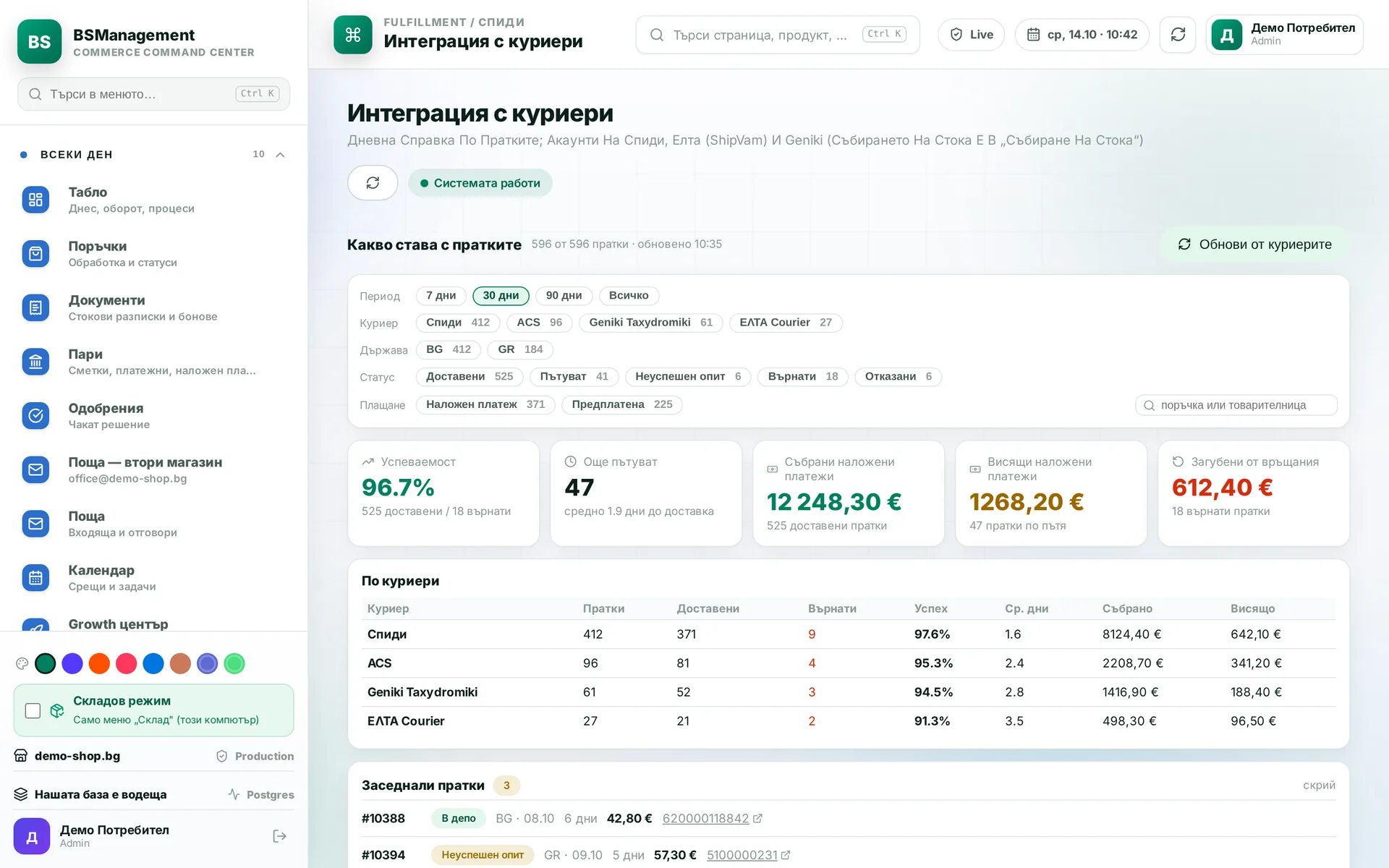
  • A report per courier on successful deliveries and returns that shows where parcels get stuck.

What it connects to

Couriers sit in the same database as orders, the warehouse and documents.

  • Warehouse: the waybill is issued when a picked order is confirmed, and a returned parcel is scanned back into the warehouse.
  • Online stores: the tracking number and statuses go back to the order in the online store.
  • Checkout: our own shipping service can show the nearest offices and lockers while the customer is still ordering.
  • Documents and money: cash on delivery, the return and the reversal are all tied to the same order.

Couriers

Full integration: the waybill is made straight from the system

  • Econt
  • Speedy
  • Geniki Taxydromiki
  • Royal Mail
  • eMAG (easybox / eMAG courier)
  • BOX NOW
  • Sameday
  • DPD (international, via the Speedy connection)
  • DHL

Tracking with a manually entered number

  • Bulgarian Posts
  • Deutsche Post
  • Post One
  • Interconnect
  • ELTA
  • GLS
  • Rapido
  • Tradefy
  • Own transport
  • Transpress (freight request only)

Modules in this solution

Speedy

The system creates the waybill straight from the order, to an address, office or locker, with cash on delivery when the order needs it. The label prints at once and the tracking number is saved on the order. Before issuing, the system checks the address against Speedy's own address lists.

Runs in: KoreanCare, LedWhite

DPD abroad via Speedy

Shipments to neighbouring countries go through Speedy's international service and are delivered by DPD. Cash on delivery is collected in the recipient's local currency. The address is checked by the rules of the destination country.

Runs in: KoreanCare

Econt

The waybill to an address or an Econt office is issued straight from the order. The operator picks the town, street and office from Econt's own lists instead of typing them. The system follows the parcel status and shows it on the order.

Runs in: LedWhite, Ivana Agro, KB Agro

ACS Greece

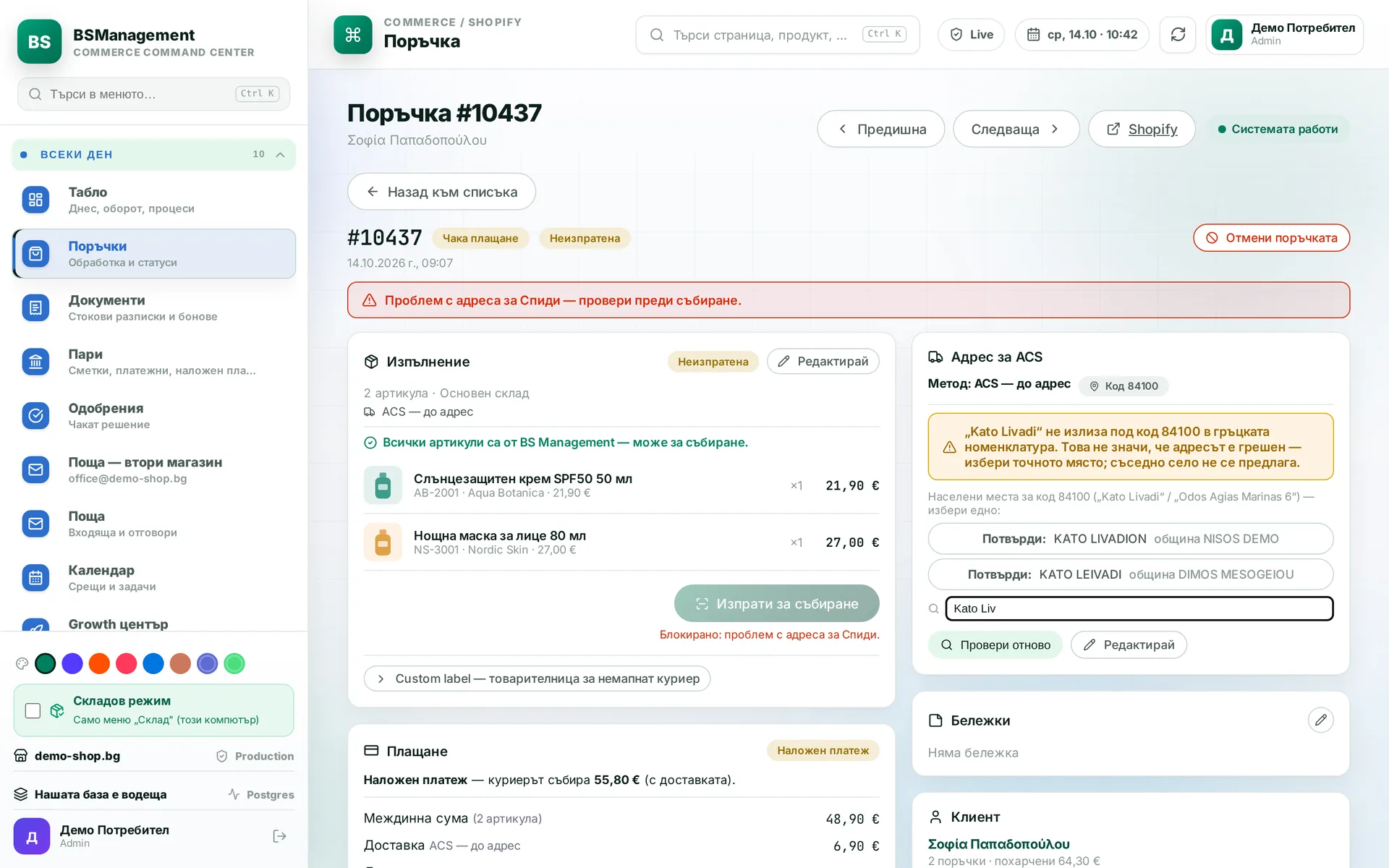
The system prepares shipments to Greece to ACS requirements: postcode, email and address lines within the allowed length. If a required field is missing, the shipment stops and the screen says why. Pickup points are offered only where the service allows them.

Runs in: KoreanCare

Geniki Taxydromiki

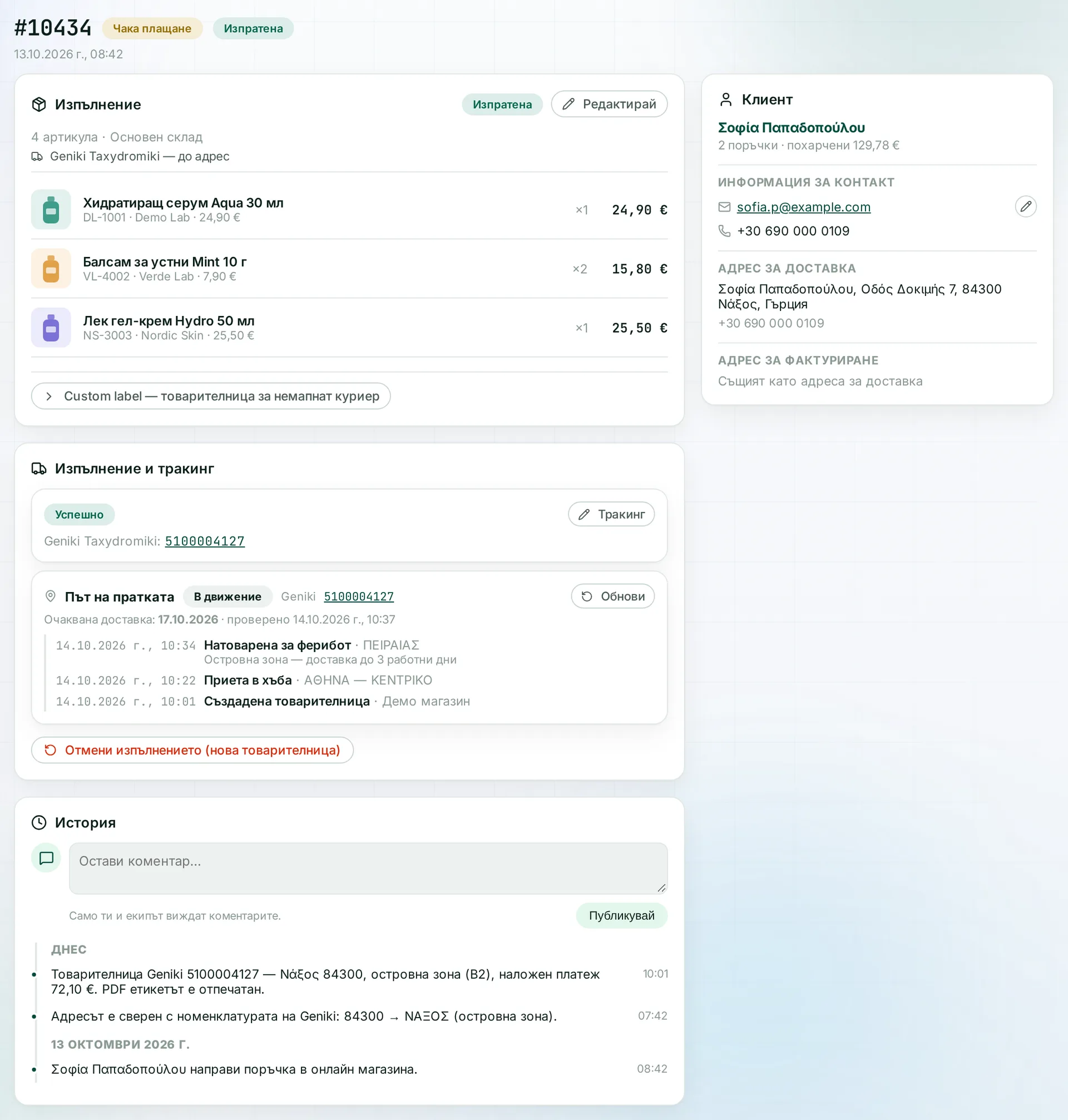
Geniki waybills are created from the order, with cash on delivery and island zones. The label comes back as a PDF and prints straight away. The system checks the address against the Greek address lists the courier uses.

Runs in: KoreanCare

ELTA

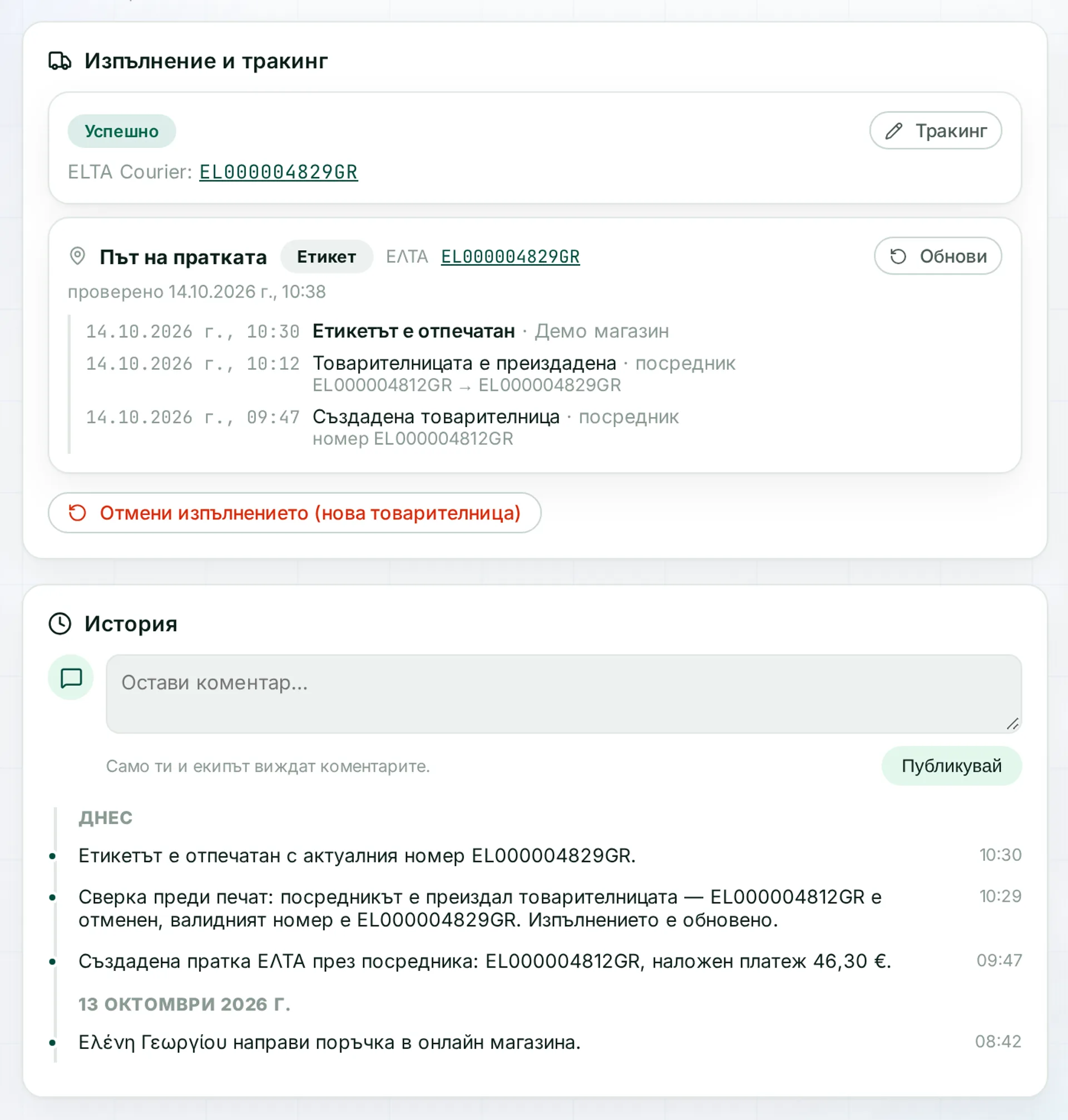
ELTA labels come through a broker. Before printing, the system checks the number, because the broker can reissue a waybill under a new number without warning. That way an outdated label never ends up on the box.

Runs in: KoreanCare

eMAG, BOX NOW, Sameday

Shipments to easybox and BOX NOW lockers and with Sameday and eMAG couriers are created from the order. The locker is chosen on the order, with nothing retyped in the courier's portal. The tracking number comes back to the order and is tracked like any other.

Runs in: BS Omni ERP

Royal Mail

The system issues labels for UK shipments. The tracking number is saved on the order and the parcel is tracked. It sits in the same list as the parcels of every other courier.

Runs in: BS Omni ERP

DHL and attached labels

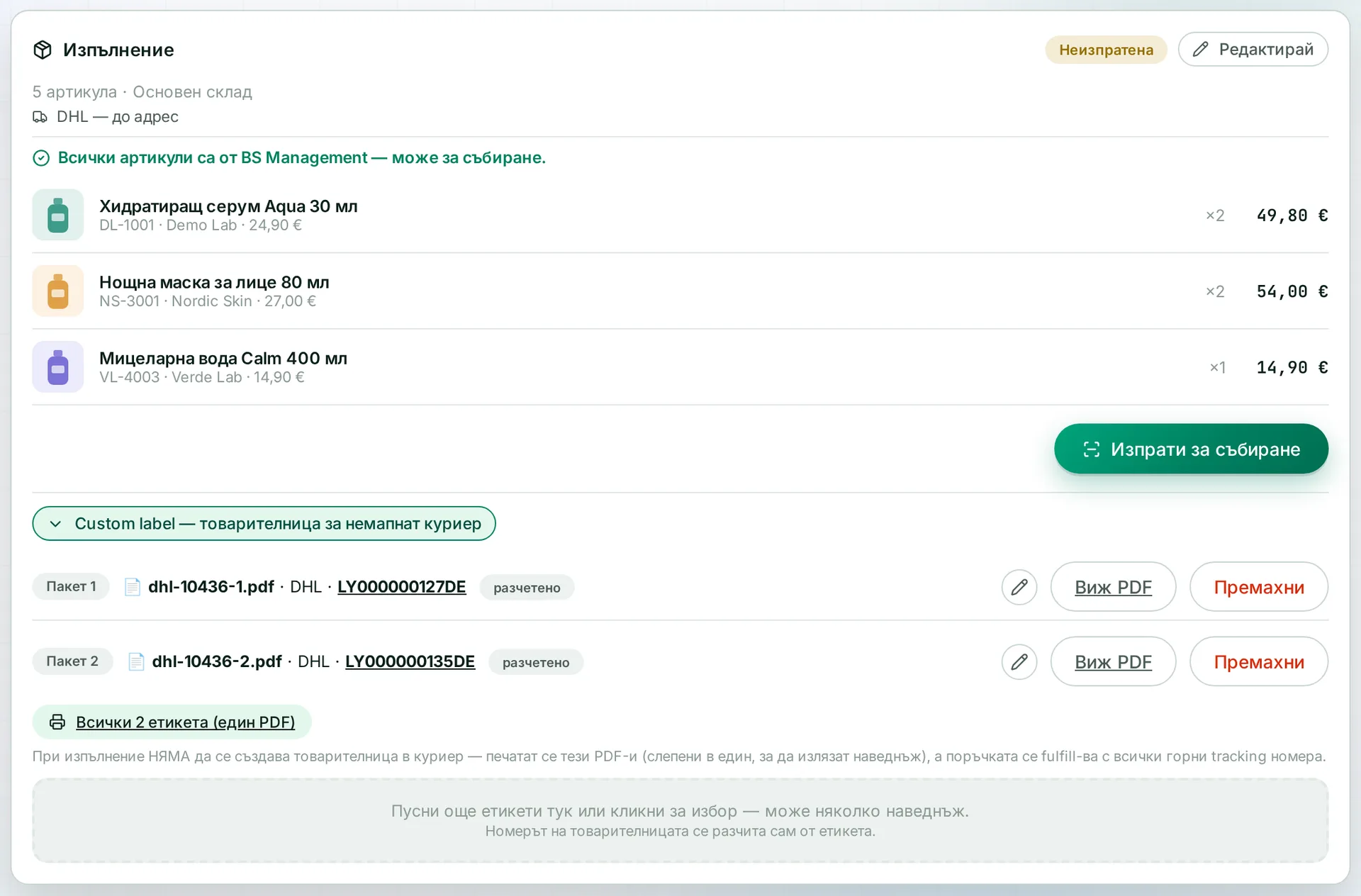
You attach a label issued outside the system to the order as a PDF, and the system reads the tracking number from the file itself. A split shipment can have several labels. They print together and all the numbers go into one fulfilment. Couriers without a full connection follow the same path as the rest.

Runs in: KoreanCare

Manual tracking numbers

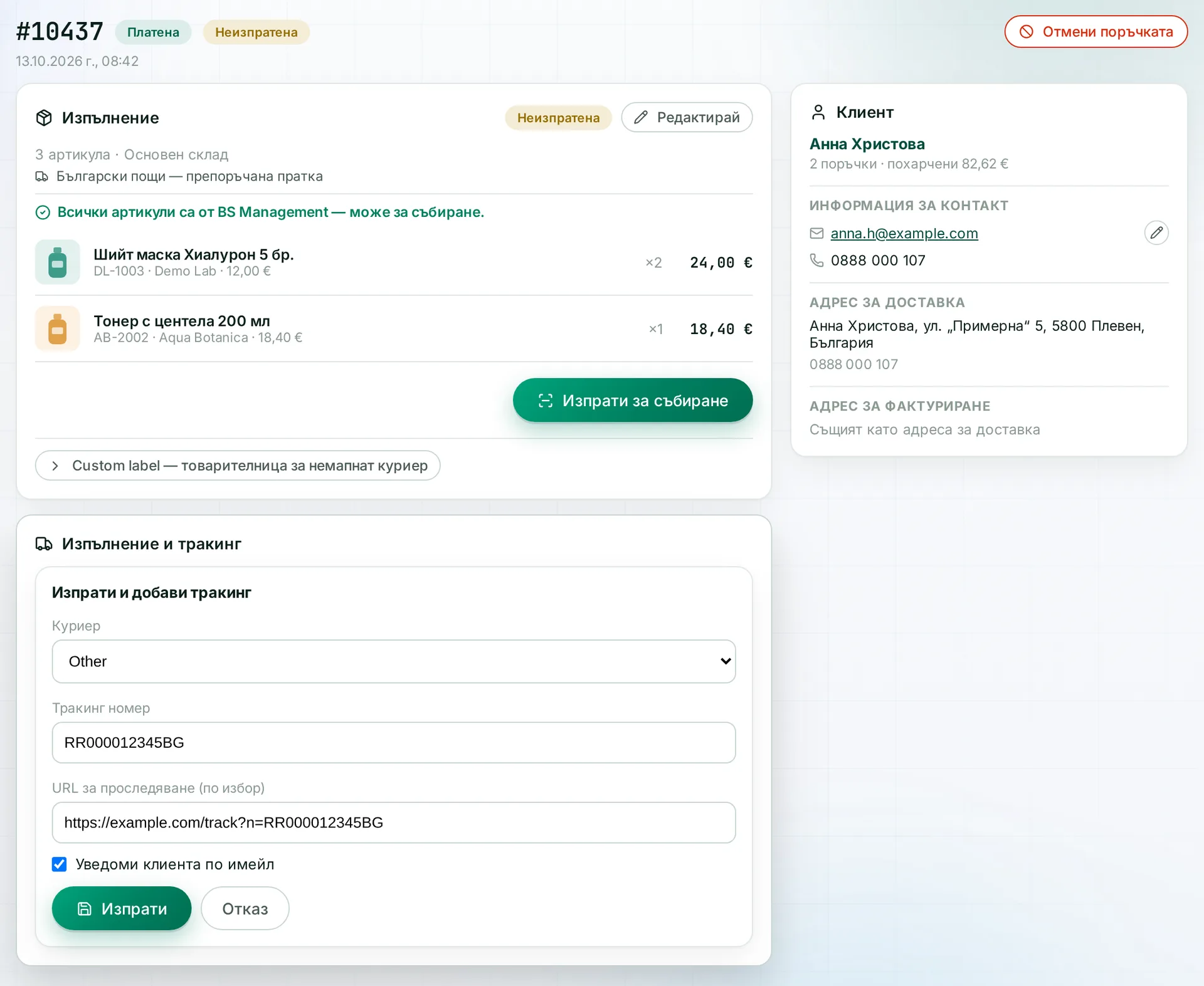
For postal services and couriers with no connection, the tracking number is typed into the order by hand. From then on the parcel is visible and tracked like the rest. You can also choose your own transport, with a price entered by hand.

Runs in: KoreanCare, Easy App, BS Omni ERP

Freight requests

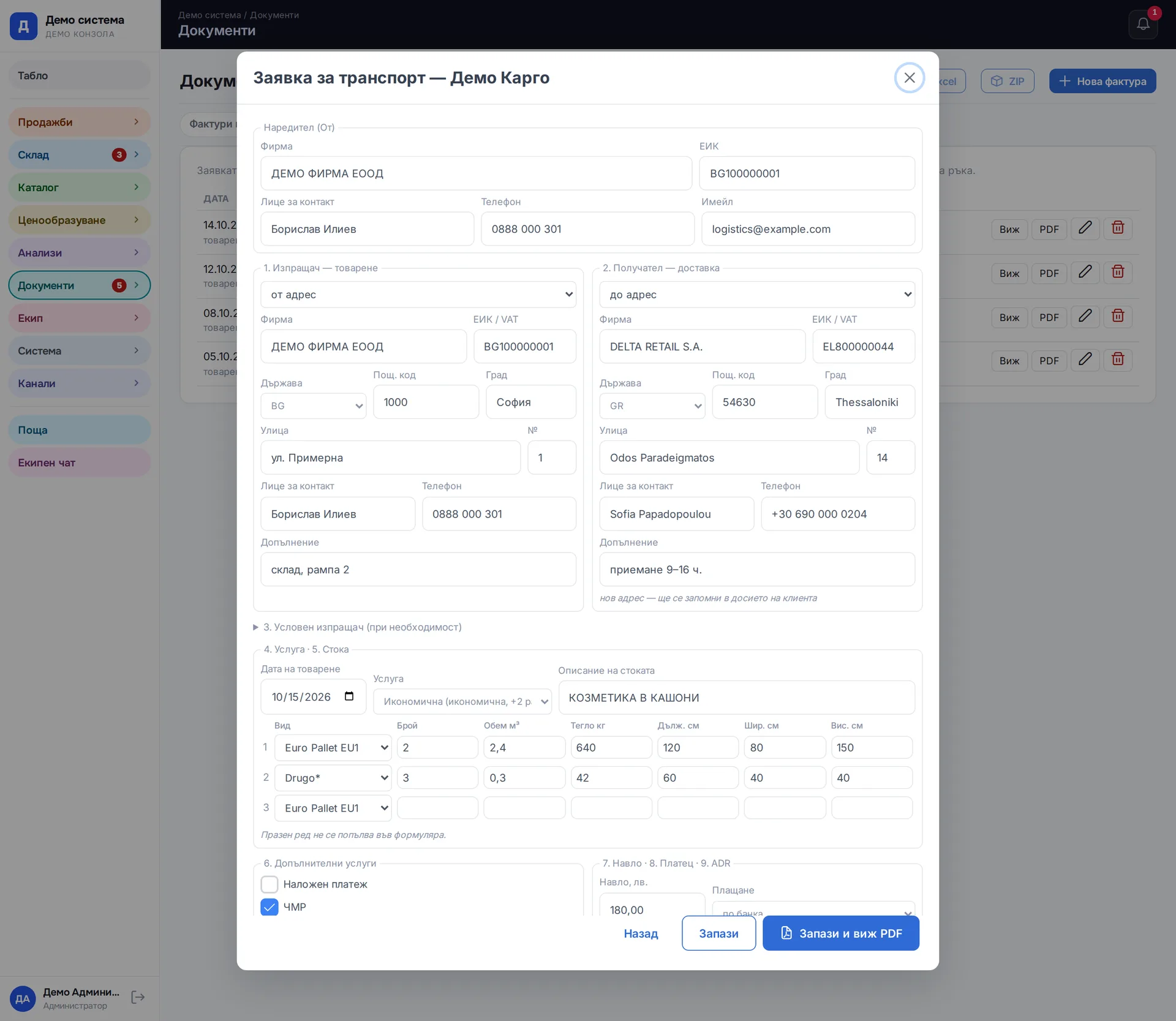
For pallet and cargo shipments you send a request to the carrier from the system. The CMR is prepared and printed there too, next to the request. All documents for a shipment live in one place.

Runs in: Easy App, BS Omni ERP

Reprint the latest label

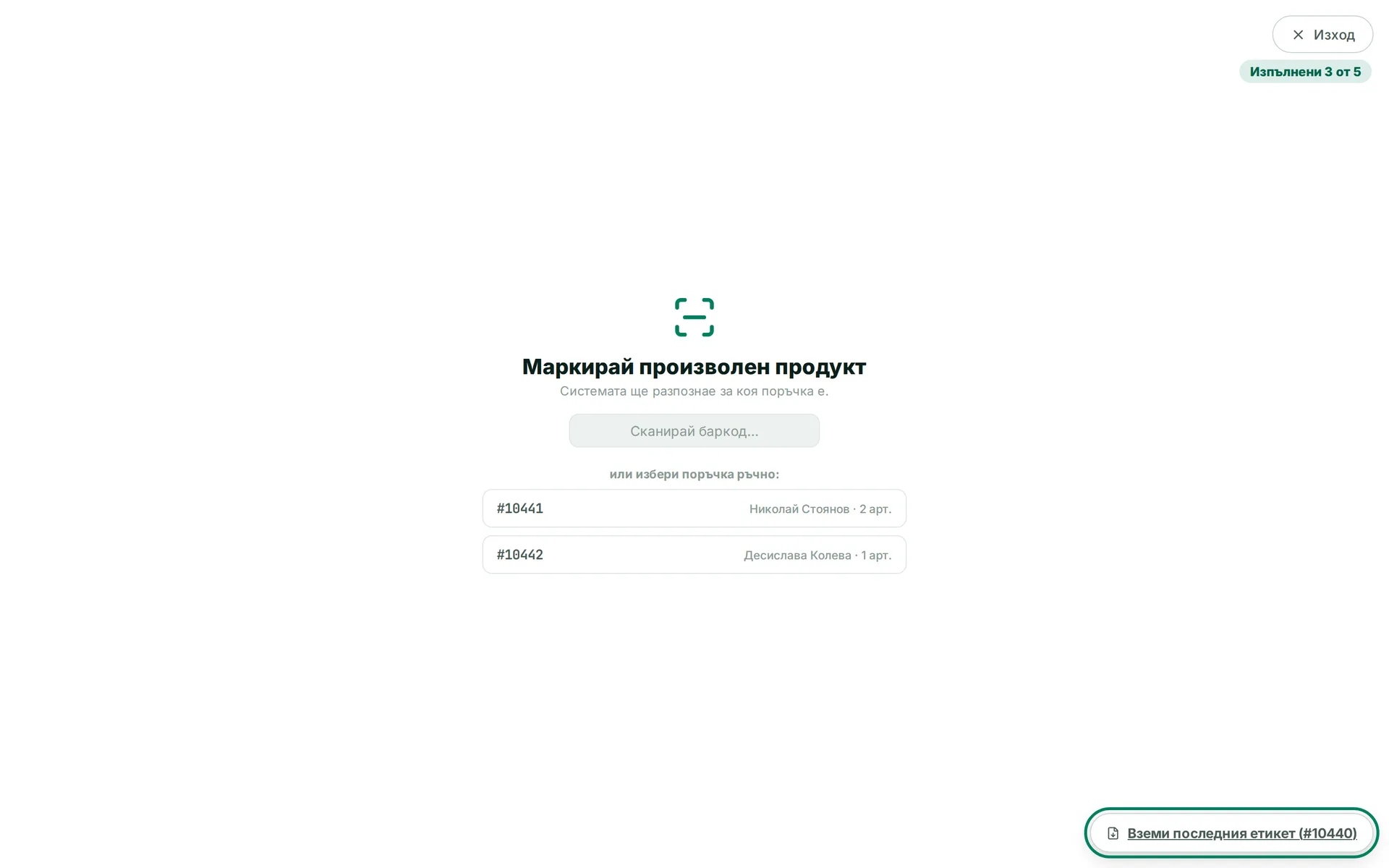
The "Get latest label" button reprints the most recent waybill, whatever the courier. It helps when the printer jams or a label tears. No new shipment is created.

Runs in: KoreanCare

Address verification

The system checks the address against the lists of the courier that will carry the parcel. A check with one courier does not count for another. An unrecognised address is flagged red and the parcel does not go out until someone confirms it. If the operator is sure of the address, they can release the parcel deliberately.

Runs in: KoreanCare, LedWhite

Greek addresses

The system matches the Greek address to the list couriers use when handing parcels to each other. It searches literally and never offers a neighbouring village in place of a missing one. A place without a postcode does not mean the address is wrong, and the system does not reject it on its own.

Runs in: KoreanCare

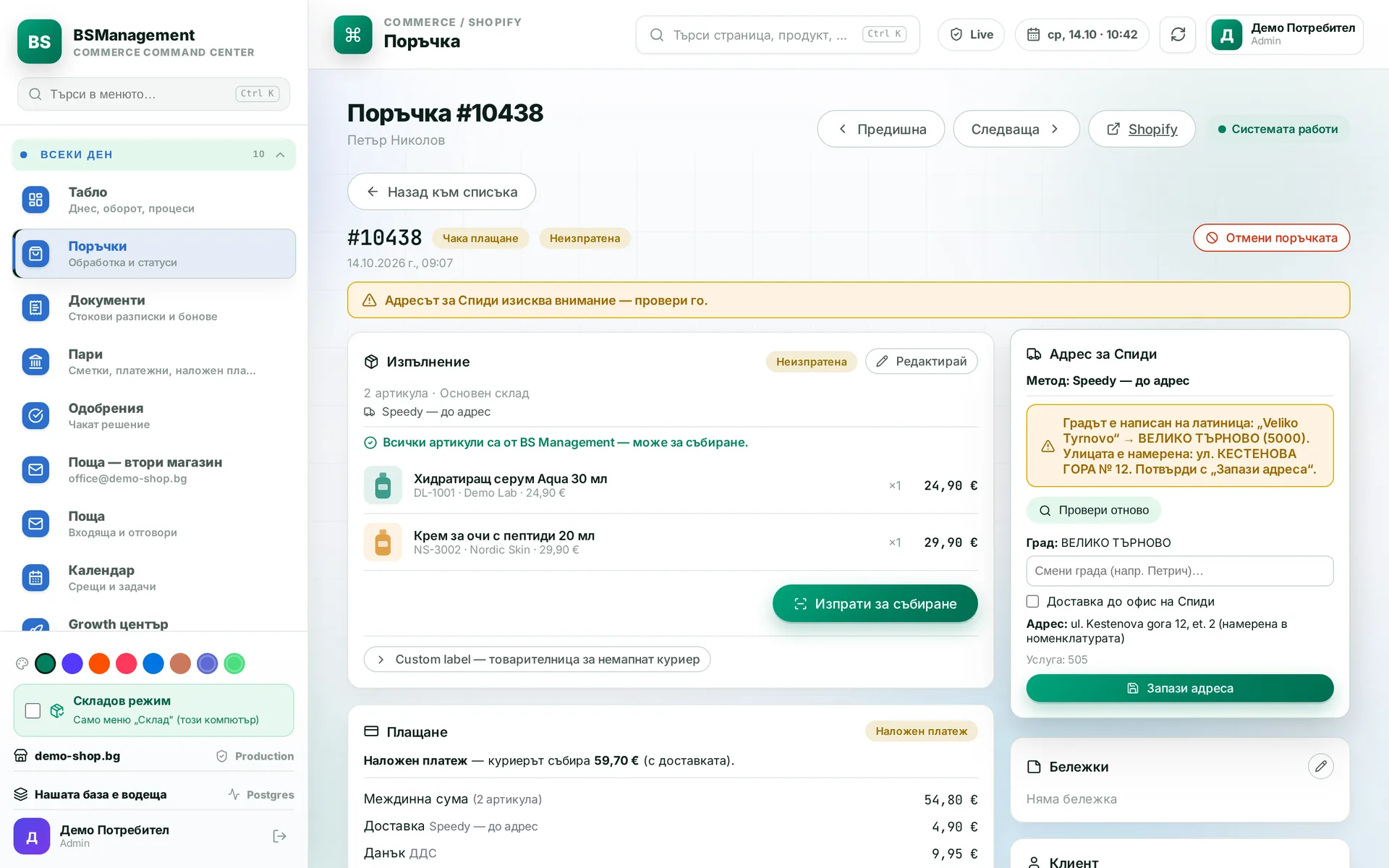
Town names in Latin script

The system finds a town written in Latin script even when it is transliterated differently. The customer may have spelled it their own way, and the system still finds the right record. The parcel is not held up by spelling.

Runs in: KoreanCare

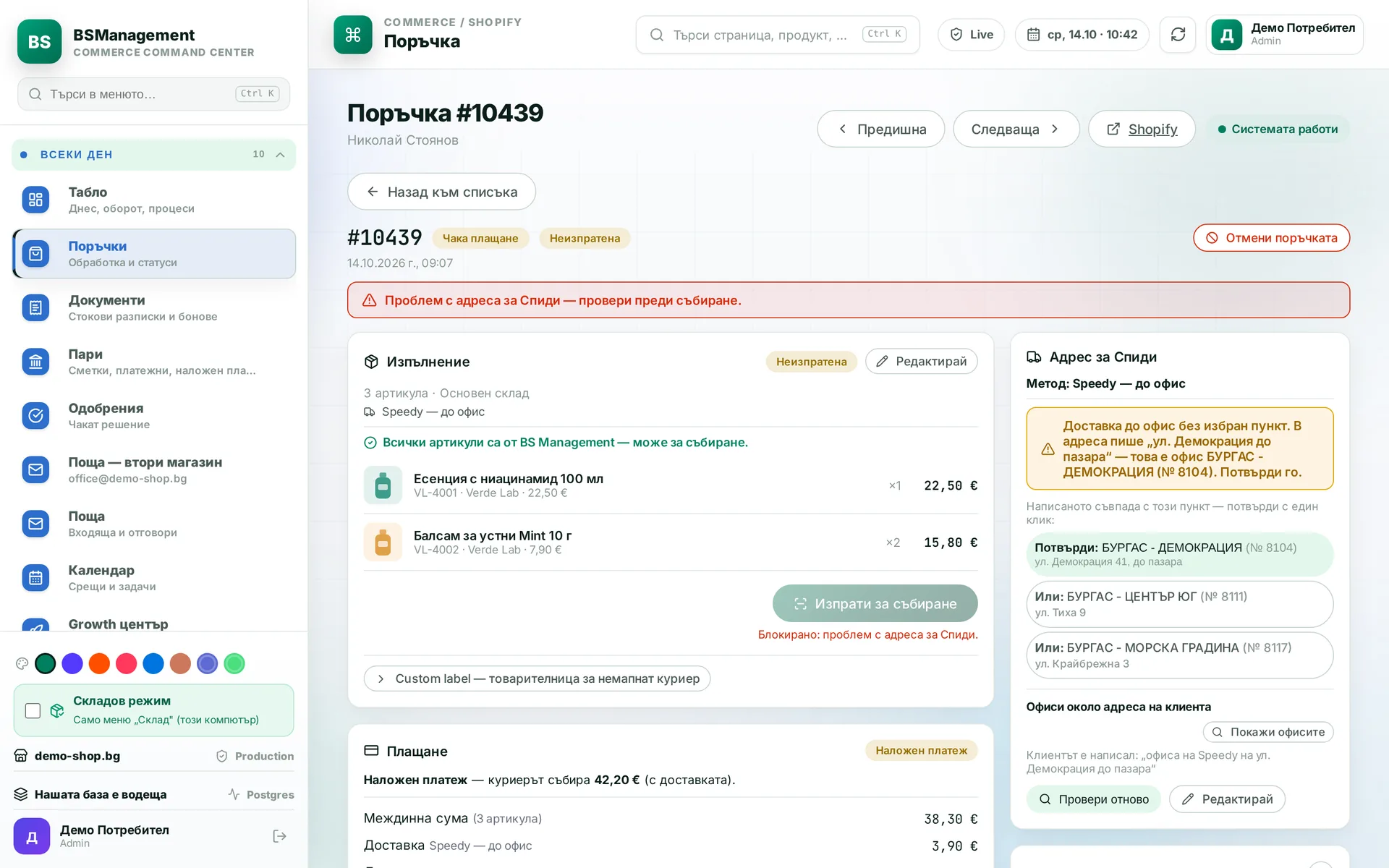
Office from the address field

When the customer chose office delivery but wrote the office into the address field, the system recognises it from the text. The operator confirms the suggested office in one click, so the final say is theirs.

Runs in: KoreanCare

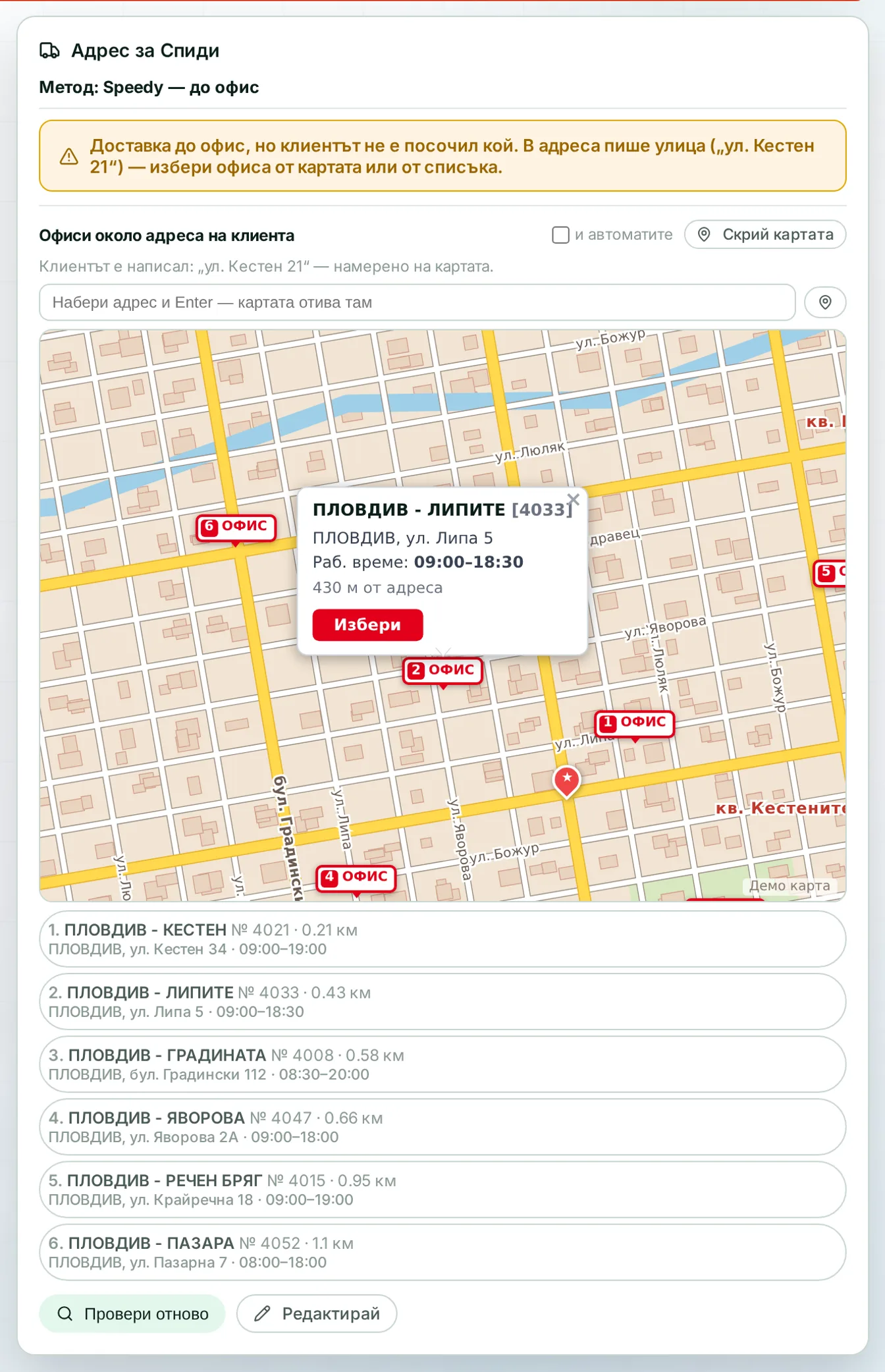
Office picker with map

The system lists the courier's nearest offices with street, distance and a map. The operator sees which office is actually close to the customer and picks it in one click. The choice is saved on the order and goes into the waybill.

Runs in: KoreanCare, LedWhite, Easy App

Courier statuses

The system pulls parcel statuses from the courier and copies them into the order in the store. The customer is notified at the two moments that matter: out for delivery and delivered. A missed status is picked up at the next check.

Runs in: KoreanCare

Daily courier report

For each courier you see delivery success, returns and cash-on-delivery amounts. A delivered COD order is marked paid automatically, with no manual tick. The report shows which courier or market is underperforming.

Runs in: KoreanCare

COD reconciliation

The system reads courier COD statements and invoices from email, or you can upload them as files. It matches lines to shipments by waybill number and recognises columns by their content, wherever they sit. You see what has been paid out, what is missing and where the courier's fee differs from the expected one.

Runs in: KoreanCare, Easy App, BS Omni ERP

Waybills for supplier deliveries

The system issues waybills for the daily shipments from the supplier to the warehouse. It attaches the waybill to the purchase order so they go out together. The supplier does not have to book a courier themselves.

Runs in: KoreanCare

COD amount

One place in the system decides whether a parcel is cash on delivery and for what amount. Every courier uses that decision instead of working it out its own way. The amount on the label matches the amount on the order.

Runs in: KoreanCare

Couriers and services in settings

Each courier and its services are records in the database: country coverage, weight limits, price rows and delivery time. The system decides which courier suits an order from these rules, with no courier name written into the code. The order shows the name, service, delivery time and price, and unsuitable couriers are listed below with the reason in grey. Access keys are stored encrypted, and the "Test connection" button shows the courier's real response.

Runs in: Easy App
Screens

Where it runs

KoreanCare

International online store for Korean cosmetics

An international Shopify store for many markets and languages, with the BS Management system around it: a warehouse with barcode and voice picking, waybills for several couriers, our own checkout shipping service, sales documents, feeds, advertising, SEO and translations into many languages.

See the project

Easy App

Own product

Own product — business app for wholesale and retail

A business app for a wholesale and retail merchant: orders from Shopify and WooCommerce, a physical shop, waiting customers and stock allocation, supplier requests, wholesale invoices with VIES checks and export, versioned price lists and a B2B site with packing lists.

See the project

Frequently asked questions

Do you work with the courier we use now?

Most likely yes, at one of the two levels. If the courier has an API, we build a full connection. If not, parcels go through with a manual number or an attached label and are still tracked and reported in the system.

What happens if the courier rejects the waybill?

The order does not vanish or end up in an unclear state. The rejection is shown with the reason the courier gave and is written to the log. The operator fixes the address or picks another service and tries again.

Can we use different couriers for different countries?

Yes. Each courier and service has its own coverage and limits, and an order only shows the ones that can take it. The address is checked against the rules of the country and of that courier.

Do you store our courier access keys?

The keys are stored encrypted on your own server and are never shown on screen. A connection test button shows you the courier's real response without creating a shipment.

Can we take only the COD reconciliation, without the waybills?

Yes. Reconciliation works by waybill number, so you can keep creating parcels the old way. We roll out in stages and each part works on its own.

Got a process that keeps getting stuck?

Describe it briefly. We will tell you how we would solve it.

Send an inquiry
Call us